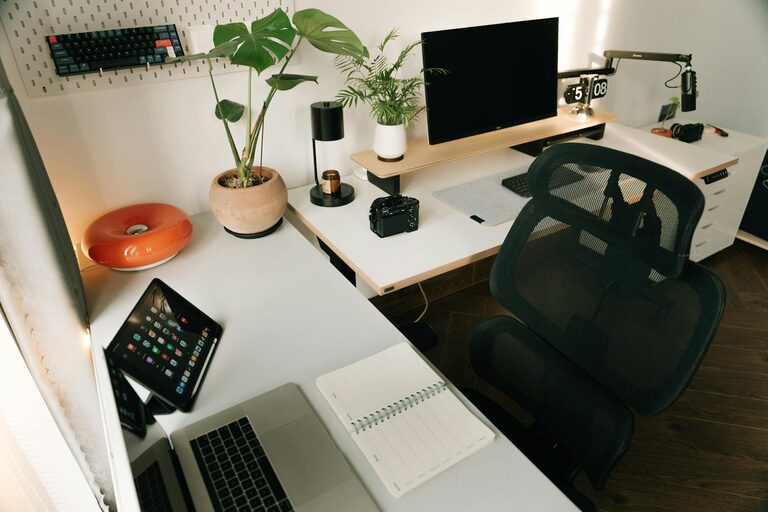

Creating a cozy and functional home workspace can greatly improve your productivity and overall work-from-home experience. Whether you have a dedicated room or just a corner in your living space, setting up the right environment helps you stay focused, comfortable, and motivated. Here are practical tips to help you design a workspace that fits your needs.
Choose the Right Location
The foundation of a good workspace is choosing the right spot. Here are some points to consider:
– Natural Light: Position your desk near a window if possible. Natural light boosts mood and energy.
– Quiet Area: Select a place with minimal noise to reduce distractions.
– Space Availability: Even a small nook can work well if it’s well-organized and clutter-free.
– Separate from Relaxation Zones: Try to keep your workspace away from your bed or TV to mentally separate work and leisure.
Invest in Ergonomic Furniture
Comfort is key to sustaining long hours of work without strain. Focus on:
– Ergonomic Chair: Choose one with good lumbar support and adjustable height.
– Desk Size: Your desk should be large enough to hold your computer, keyboard, and other essentials without crowding.
– Adjustable Desk Options: Standing desks or adjustable desks can be great to change posture during the day.
Organize and Declutter
A tidy workspace improves focus and creativity. To get started:
– Storage Solutions: Use shelves, drawers, or boxes to keep supplies organized.
– Minimal Decor: Avoid overloading your desk with unnecessary items.
– Cable Management: Use clips or cable sleeves to keep cords neat.
– Daily Cleanup: Spend a few minutes each day tidying to maintain order.
Personalize Your Space
Adding personal touches makes your workspace inviting and inspiring. Consider:
– Plants: Small indoor plants improve air quality and add a fresh look.
– Artwork or Photos: Display a few favorite pictures or artwork to boost mood.
– Soft Textiles: A cozy rug or cushion can add warmth and comfort.
– Lighting: Add a desk lamp with adjustable brightness for late work hours or cloudy days.
Optimize Technology Setup
Efficient technology reduces frustration and streamlines work.
– Reliable Internet Connection: Make sure your Wi-Fi is strong in your workspace.
– Monitor Placement: The top of the screen should be at eye level to prevent neck strain.
– Keyboard and Mouse: Choose ergonomic models that feel comfortable to your hands.
– Headphones: Noise-canceling headphones are helpful if your workspace isn’t fully quiet.
Set Boundaries and Routine
Creating a clear separation between work and home life helps maintain balance.
– Work Hours: Establish regular working hours and communicate them to family or housemates.
– Breaks: Take short breaks every hour to stretch and rest your eyes.
– End-of-Day Ritual: Develop a routine to signal the end of work, like turning off your computer or tidying your desk.
Enhance Comfort and Ambiance
Small touches can make your workspace feel cozy and welcoming:
– Temperature Control: Use a fan, heater, or open a window as needed to stay comfortable.
– Aromatherapy: A diffuser with calming scents like lavender can improve focus and relaxation.
– Sound: Soft background music or white noise may help concentration.
Keep Flexibility in Mind
Your needs may change over time. Keep your workspace adaptable by:
– Modular Furniture: Use pieces that can be rearranged easily.
– Portable Supplies: Store frequently used items in a caddy or tote.
– Dual Use Spaces: If your workspace doubles as a guest room or dining area, use foldable or compact furniture.
—
Creating a cozy and functional home workspace doesn’t require a large budget or a perfect room. With thoughtful planning and simple adjustments, you can build an environment that supports your work and wellbeing. Start with a clear location and build from there, focusing on comfort, organization, and personalization to boost your productivity every day.

Related Posts